
BioDesk
A compact terminal that captures name, face, 4-4-2 fingerprints and signature — and takes a fully ICAO-compliant portrait with almost no manual operation.
BioDesk is built around the hardest part of identity registration: getting a portrait that will pass. An auto-focus camera on an adjustable column, an integrated light source and our photo optimisation software work together so a compliant photo is captured on the first attempt, in the space of a desk. On our enrolment platform, with Windows and a touch-screen interface in the standard unit, fingerprint scanning, ID document reading and signature capture run on top of the photo — which makes one small terminal a complete personal data enrolment system for ID cards, passports and other secure identity documents.
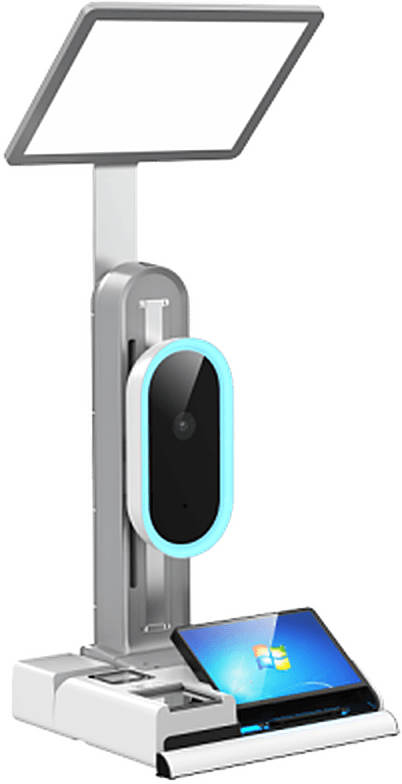
Built around the portrait, extended into full enrolment
Face capture
An auto-focus camera frames and focuses the portrait itself, so it is sharp and ICAO-compliant on the first frame with no optics for the operator to adjust.
4-4-2 fingerprints
Four fingers of each hand and both thumbs, captured in the standard slap sequence at the same terminal as the portrait.
Signature capture
The applicant signs at the same station, so the specimen signature is bound to the record that has just been captured.
ID document reading
Existing identity documents are read at the desk, so the breeder record is digitised into the same enrolment session.
Automatic height adjustment
The camera head finds the applicant’s face and travels up or down its column to meet it — standing or seated, adult or child — so nobody has to re-rig the terminal between applicants.
Light where it is needed
A light source integrated into the top of the column lifts the photo quality on its own. A white backdrop with an adjustable light is available to improve it further.
Photo optimisation built in
Our photo optimisation program is embedded in the capture application, checking and correcting the portrait as it is taken rather than after the applicant has left.
About the Photo QMSWindows and a touch screen
The standard unit runs Windows with a touch-screen interface, so the capture application and the rest of the enrolment client run on the terminal itself.
Voice guidance throughout
The terminal talks the applicant through the whole capture, step by step, which is what keeps an unfamiliar person moving without an operator leaning over the screen.
Card and barcode reading
A contactless reader for ISO 14443 Type A and B cards, and a scanner that takes 1D barcodes along with QR, Data Matrix, PDF417, Aztec, MaxiCode and Han Xin codes.
Compact footprint
The whole station occupies little more than a desk, which is what lets a registry put a row of enrolment positions into a small office.
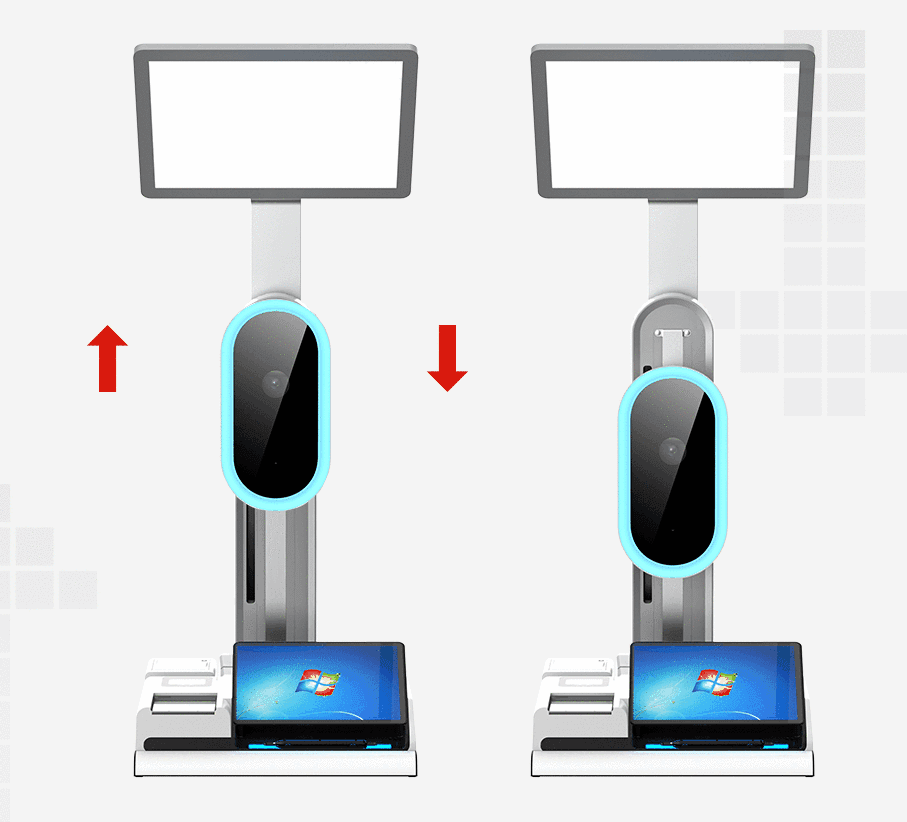
The camera moves to the applicant
The camera head travels up and down its column, so the portrait is framed correctly whether the applicant is standing or seated, tall or a child — without asking anyone to crouch or stretch, and without the operator re-rigging the station between applicants. Together with the auto-focus and the integrated light, that is what keeps the capture to a single attempt.
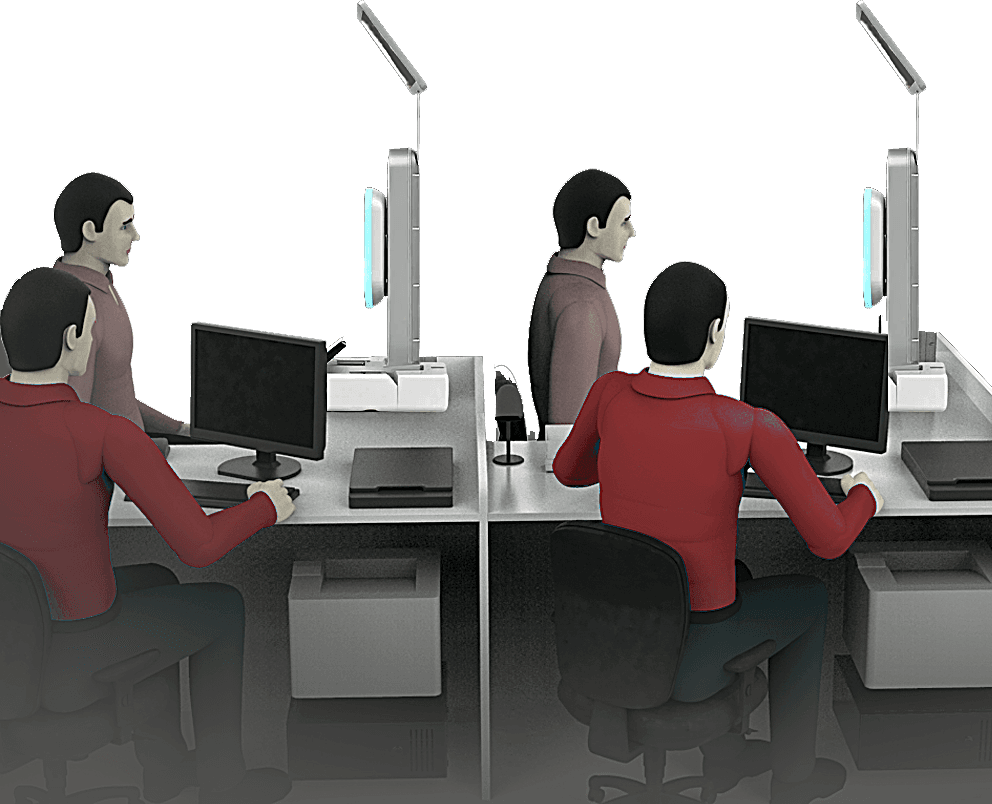
Several positions in one room
Because the whole station is the size of a desk, a registry can line up positions along a counter rather than building a studio for each one. The operator works from their own screen on one side; the applicant sits at the terminal on the other, facing the camera, and the two only meet over the record being created.
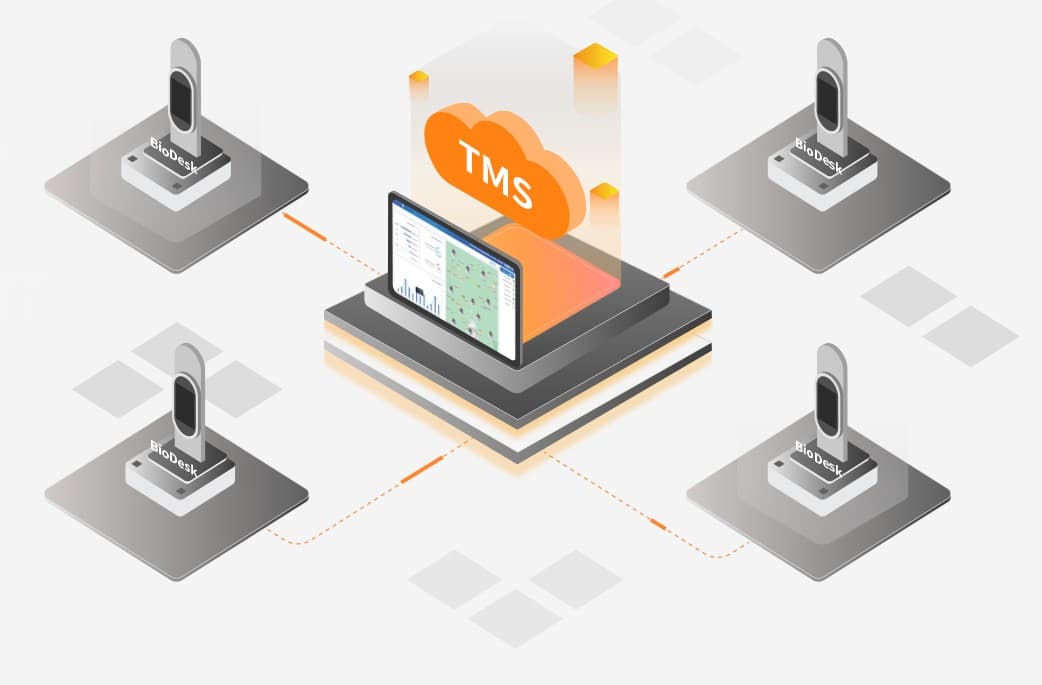
Every terminal on one screen
Terminals are rarely deployed one at a time. The Terminal Management System gives administrators a single system over the whole estate — so status, configuration and content are handled centrally instead of by visiting each desk in turn.
Technical specification
Terminal
- Dimensions
- 390 × 400 × 1030 mm (L × W × H)
- Weight
- Approx. 15 kg
- Power
- DC 24 V, 5 A
- Interfaces
- DC input × 1
- USB 3.0 Type-A × 2
- USB Type-B × 1
- Speaker
- 4 Ω, 5 W × 2
Touch screen
- Display
- 10.1 inch
- 1920 × 1200
- Touch
- Multi-touch capacitive
- Handwriting
- Passive electromagnetic pressure sensing
- 2048 pressure levels
Camera and lifting
- Camera
- CMOS sensor, 48 megapixels effective
- Photo output 12 megapixels, 3000 × 4000
- Working distance 80 cm
- Lifting mechanism
- 290 mm of travel
- Adjustable speed
Fill lighting
- Top light
- 5500 K, 25 W
- Brightness adjustable
- Middle ring light
- 5500 K, 10 W
- Brightness adjustable
- Bottom light
- 5500 K, 10 W
- Brightness adjustable
Reading and capture
- Contactless card reader
- ISO 14443 Type A and Type B
- 13.56 MHz
- Barcode scanner
- 1D barcodes
- QR, Micro QR, Data Matrix, PDF417, Micro PDF417, Aztec, MaxiCode, Han Xin
- LED white illumination
- Fingerprint scanner
- LES sensor
- Capture area 88.9 × 80.01 mm, effective 81.28 × 76.3 mm
- 500 PPI
Interested in this system?
Tell us about your issuance program and we will advise on the right configuration.
Get in Touch